
TL;DR:
Installing Databricks Connect disrupts standard local testing because it replaces the native PySpark library—which is built to run Spark sessions directly on your machine—with a specialized version designed exclusively for remote connectivity. This incompatibility makes traditional local Spark unit testing impossible within the same environment. To maintain a functional test suite, you must shift your development architecture away from local Spark execution and toward a remote-session model, such as hosting a local spark master server via containers.
Testing serves as a cornerstone for any production-ready application, boosting reliability across local development as well as pipelines. Yet, the transfer to cloud-native ecosystems like Databricks can lead to unexpected difficulties. We discovered such a difficulty by the use of the Databricks-owned client library Databricks Connect.
Why? The integration of the library can break local testing workflows.
At Real I.S. AG, we are developing a data integration platform powered by Databricks. As part of our toolkit, we utilize Databricks Connect. However, we identified that this specific package requires special handling of running tests.
This post explores the technical nuances of this error, provides a deep dive into the mechanics of Databricks Connect, and outlines our solution for maintaining a seamless, working test environment.
Databricks Connect as glue between you and Databricks
Apache Spark is one of the leading distributed processing and analytics engines, being used in a variety of our projects. The PySpark package refers to the standard, native way of interacting with Spark using Python. Under the hood, it installs in its package Java dependencies to create local SparkSessions directly on your development machine. This approach is powerful for local development and testing, as it allows you to run Spark computations without connecting to a remote cluster:
|
1 2 3 4 5 6 7 |
from pyspark.sql import SparkSession spark = SparkSession.builder.getOrCreate() df = spark.createDataFrame( [(1, "foo"),(2, "bar"),], ["id", "label"] ) |
A modern Databricks setup often utilizes the client library Databricks Connect. This package enables the integration of various IDE’s such as PyCharm or VSCode. This enables features like access to Databricks compute, debugging functionality, and more. Connect can be installed as usual as package:
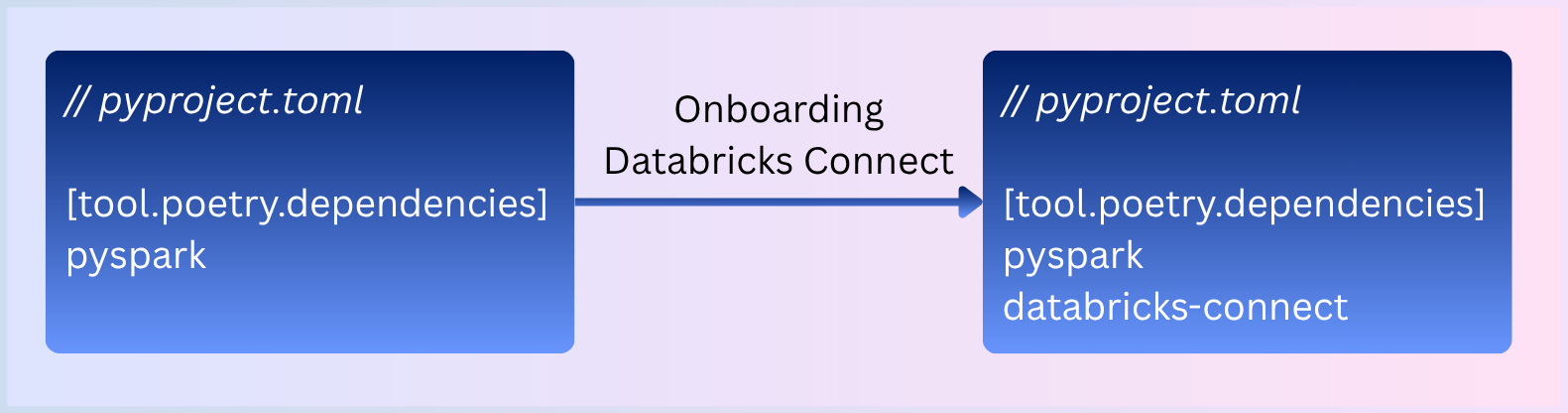
Attempting to use the native PySpark approach (creating a local SparkSession) in an environment configured for Databricks Connect will result in a RuntimeError, as Databricks Connect only supports remote sessions:
|
1 2 3 4 |
from pyspark.sql import SparkSession spark = SparkSession.builder.getOrCreate() # RuntimeError: Only remote Spark sessions using Databricks Connect are supported. Use DatabricksSession.builder to create a remote Spark session instead. |
The reason for this: Databricks Connect will replace your existing PySpark package with a specialized version for Databricks. As such, it is designed for remote sessions only, removing the capability to host local sessions.
- Digging into the Connect package clarifies this behaviour. Only remote configuration settings are evaluated. If those are missing, the above RuntimeError is raised by default.
Instead of running Spark locally, it must establish a connection from your IDE to a remote Spark cluster, e.g. a high-performance cluster hosted on Databricks.
- For the sake of readability, we will continue with a setup working with remote sessions locally. If you are interested in the details, how and why Databricks Connect replaces certain packages such as PySpark, jump to “An excursion into Databricks Connect” below.
To connect to a Spark server, you can still use the remote session builder from the replaced PySpark package:
|
1 2 3 4 |
from pyspark.sql import SparkSession # Remote session via Spark Connect (sc) spark = SparkSession.builder.remote("sc:// |
The implication for running local tests is that you have to provide a Spark server. Containers will simplify this drastically.
Devcontainers to the rescue
Devcontainers provide a modern approach to keeping the development environment reproducible and consistent. A typical approach is a single container, mirroring the runtime and libraries of the production system.
The requirement of a remote SparkSession can be solved by the introduction of a second devcontainer: an open-source Spark server, provided as Docker image.
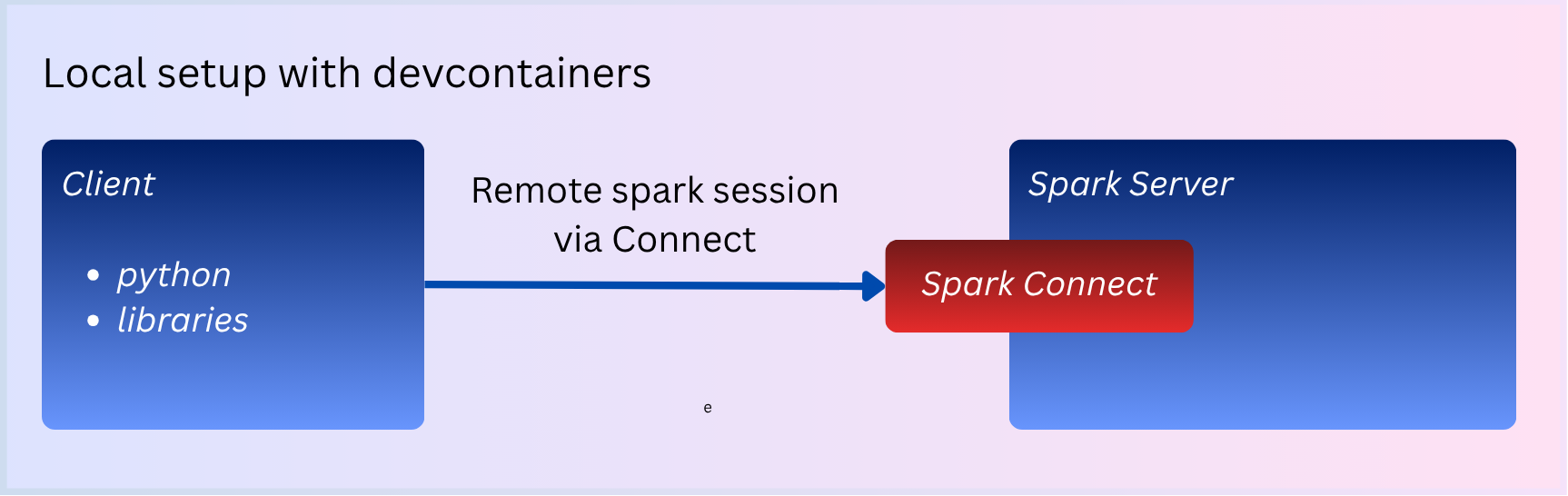
After configuring the SparkSession Builder to reference the container, a remote SparkSession can finally be established using Spark Connect.
|
1 2 3 4 |
from pyspark.sql import SparkSession # Reference the name of the spark container spark = SparkSession.builder.remote("sc://spark").getOrCreate() |
Integrating pytest
A parameterized test using an agnostic Spark as fixture might be:
|
1 2 3 4 5 6 7 8 9 10 11 12 13 14 15 16 17 18 19 20 21 22 23 24 25 26 27 28 29 30 31 32 33 34 35 36 37 |
# tests/test_spark.py from collections import namedtuple import pytest Metadata = namedtuple("Metadata", ["description"]) PySparkTestParameter = namedtuple( "PySparkTestParameter", ["metadata", "data", "schema", "expected_count"] ) @pytest.mark.parametrize( "params", [ PySparkTestParameter( metadata=Metadata("simple"), data=[ (1, "foo"), (2, "bar"), ], schema=["id", "label"], expected_count=2, ) ], # more verbose logs ids=lambda p: p.metadata.description, ) def test_pyspark(spark, params): df = spark.createDataFrame( data=params.data, schema=params.schema, ) df.show() assert df.count() == params.expected_count |
Using the multi devcontainer setup, the fixture can be constructed as follows:
|
1 2 3 4 5 6 7 8 9 10 11 12 13 14 |
# tests/conftest.py import pytest from pyspark.sql import SparkSession @pytest.fixture(scope="session") def spark() -> SparkSession: _spark = SparkSession.builder.remote("sc://spark").getOrCreate() # add missing configurations _spark.conf.set("spark.sql.pyspark.legacy.inferMapTypeFromFirstPair.enabled", True) _spark.conf.set("spark.sql.execution.pandas.inferPandasDictAsMap", False) return _spark |
Running pytest now leads to the desired output: A locally running SparkSession using Databricks Connect!
|
1 2 3 4 5 6 7 8 9 10 |
((python_venv) ) vscode ➜ /workspace (master) $ pytest -v ==================================================================== test session starts ===================================================================== platform linux -- Python 3.12.12, pytest-9.0.2, pluggy-1.6.0 -- /python_venv/bin/python cachedir: .pytest_cache rootdir: /workspace configfile: pyproject.toml plugins: anyio-4.12.1 collected 1 item tests/test_spark.py::test_pyspark[simple] PASSED |
An excursion into the Databricks Connect Python package
TL,DR: Databricks-Connect will replace your native PySpark package with a specialized version for the Databricks platform, unable to host a local SparkSession. Both packages are mutually exclusive to each other.
Let’s take a look into the package of Databricks Connect itself:
|
1 2 3 4 5 6 7 8 9 10 11 12 13 14 15 16 17 18 19 20 21 22 23 24 25 26 |
> pip download databricks-connect -d download --no-dependencies > cd download > unzip databricks_connect-*.whl > tree -L 2 . . ├── databricks │ ├── __init__.py │ └── connect ├── databricks_connect-16.1.7-py2.py3-none-any.whl ├── databricks_connect-16.1.7.data │ └── scripts ├── databricks_connect-16.1.7.dist-info │ ├── entry_points.txt │ ├── METADATA │ ├── RECORD │ ├── top_level.txt │ └── WHEEL ├── delta │ ├── __init__.py │ └── ... └── pyspark ├── __init__.py ├── ... ├── sql.py ├── session.py └── ... |
Besides databricks.connect itself, two additional packages can be found: delta and pyspark. When further investigating into the wheel folder databricks_connect-16.1.7.dist-info (see https://packaging.python.org/en/latest/specifications/binary-distribution-format/#binary-distribution-format for more information), we identify that Databricks Connect takes priority over any prior installed delta/pyspark package and replaces them.
|
1 2 3 4 5 6 7 8 9 10 11 12 13 |
> cat databricks_connect-16.1.7.dist-info/top_level.txt databricks delta pyspark > cat databricks_connect-16.1.7.dist-info/METADATA ... Provides: pyspark Obsoletes: pyspark ... > du -s -m pyspark 11 pyspark # 11 Megabyte. Much less than native PySpark as Java dependencies are missing (required for local session) |
Minimal working example
Clone the example and run it yourself in the IDE of your choice: https://github.com/inovex/databricks-pyspark-local-testing-demo
Summary
Databricks Connect will break your ability to create a local Spark server using the PySpark package. However, you can still create remote sessions which are hosted on Databricks or otherwise available to you (such as a locally running Spark server). Using devcontainers, you are able to host both your development environment and a Spark server in a developer-friendly way. And continue to run your tests familiar to you.
The drawback of this approach is a limited set of functionality compared to the Databricks ecosystem. Some features may not work for your individual use case: the Spark Connect server (and thus the remote session) provides a limited subset of the full Databricks ecosystem’s functionality. Features that rely on deep integration with Databricks-specific services – such as special data types or other proprietary utilities – may not be fully available in this standalone environment. Developers must validate that this approach covers all essential features required for their individual use case.